
Phoner: Second Phone Number
Phoner Holdings LLCCommunication
4.15.54K Reviews
- Version
- 8.70.1
- Installs
- 1.00M
- Age Rating
- Everyone
Screenshots
Our Review of Phoner: Second Phone Number
 Analysis by Appyee
The first few days with a second number can feel like a small but meaningful upgrade: you can give out a contact route that isn’t your everyday one, then keep calls and messages in a separate app. That’s the practical appeal of Phoner: Second Phone Number. I see it as a tool for drawing a boundary, not as a replacement for a regular mobile line. Whether it earns a permanent place depends on whether you have a recurring reason to keep that boundary in place.
When a separate line solves a real problem
A second number is most useful when the same contact details would otherwise follow you from one part of life into another. Think of a person selling a bike online, a freelancer speaking with a new client, or someone arranging a first date. You can share a number for that interaction without handing over the one friends and family already use.
That separation is helpful, but it isn’t magic anonymity. A number can reduce how widely your personal contact details circulate; it does not make every conversation untraceable or guarantee that the other person will behave well. I’d still avoid sending sensitive information to a stranger and would treat the extra line as a privacy boundary, not a complete security plan.
For a one-off marketplace exchange, the key question is whether you’ll remember to stop using the extra number once the transaction is over. For freelance work, the value is clearer if clients may contact you repeatedly and you want their calls to arrive through a distinct channel. The app makes more sense when the need has a rhythm, rather than being a novelty you try once and forget.
A sensible first-week workflow
In the first week, I’d give the number one defined job before sharing it. For example, use one line for online listings and keep business enquiries on another only if there’s enough activity to justify that split. A label helps you remember why you created each number, but the habit matters more: decide which people should get which number before a message arrives.
I’d also test the basics with someone I trust before putting the number on a public listing. Make a short call, send a text, and check where incoming activity appears. That simple rehearsal can reveal whether the way you switch between numbers feels clear enough for a busy day. It is less stressful to learn the routine with a familiar contact than while a prospective buyer is waiting for an answer.
Phoner is a communication app from Appsverse, Inc. Its appeal is straightforward: it brings calls and texts for an additional number into the phone you already carry. The app is free to install, with in-app purchases ranging from under a dollar to just under a hundred dollars per item, so I’d check the current purchase options against how often I expect to use the line rather than assume that every use will be cost-free.
What’s Phoner All About?
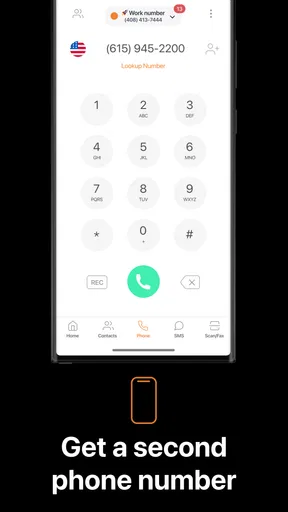
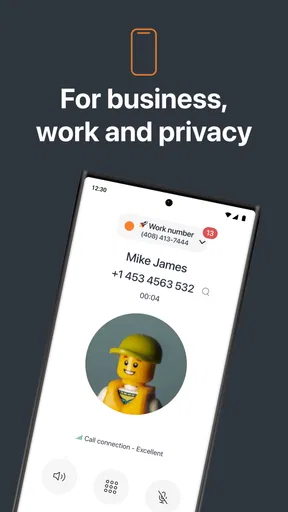
Phoner is your go-to app if you’re looking to add a second phone number to your existing phone. Whether you’re managing a side hustle, online dating, or just needing a number to hand out to people you’re not quite sure about yet, this app has got you covered.
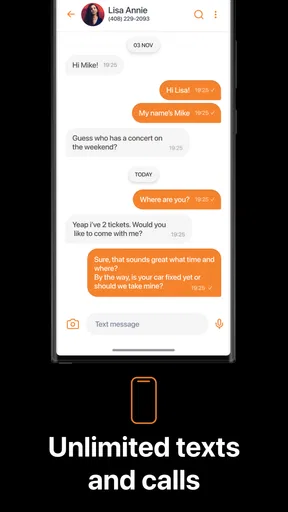
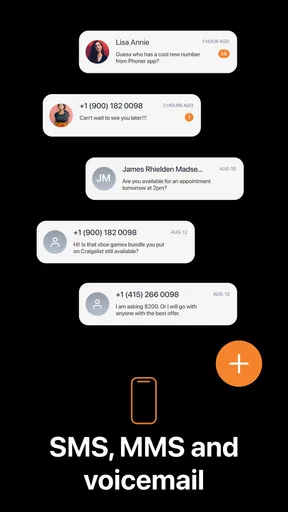
The concept is simple but brilliant. You download the app, sign up, and voilà, you have access to multiple phone numbers. It’s like having a Swiss army knife for your phone communications. You can make calls, send texts, and even receive voicemails using your new number. It’s perfect for those moments when you need to keep things separate and secure.
Setting Up Your New Number
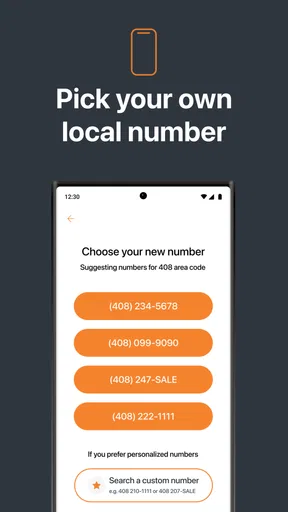
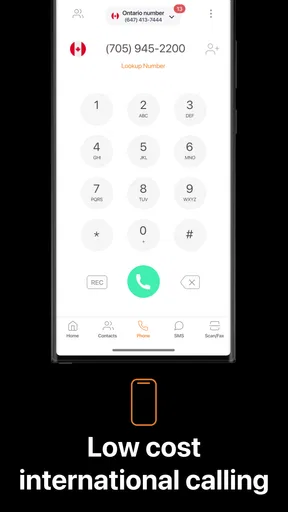
The setup process is a breeze. After downloading Phoner, you just follow a few quick steps to get your second number. You can choose from a variety of area codes, making it feel like you’ve got a local number even if you’re halfway across the world. This feature is especially handy if you’re running a business or frequently traveling.
Once you’ve got your new number, it integrates smoothly with your existing phone functions. There’s no need to switch apps constantly or worry about missing important calls or messages. It’s all right there at your fingertips.
Features That Stand Out
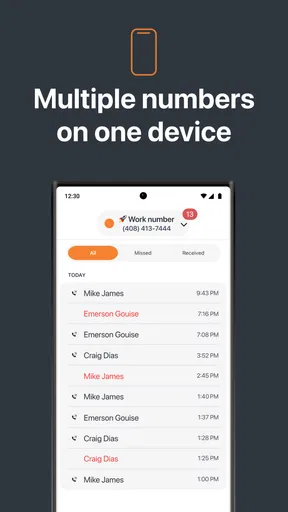
One of the standout features of Phoner is its flexibility in managing multiple numbers. You can get numbers for different purposes without any fuss. Whether it’s for business, personal use, or selling something online, you’re covered.
The app also offers private texting, which is a huge plus for maintaining your privacy. Let’s face it, not everyone needs to have your personal number, and with Phoner, they don’t have to. Plus, the app uses encryption for your calls and texts, adding an extra layer of security to all communications.
If you’re someone who likes to keep things organized, the app lets you label and customize each number. Keep track of which number is used for what purpose without getting them mixed up. It’s like having a digital Rolodex built right into your phone.
User Experience and Interface
Using Phoner is pretty intuitive. The interface is clean and user-friendly, making navigation a breeze. Even if you’re not the most tech-savvy person out there, you’ll find it easy to switch between numbers, check your call history, and manage your settings.
The app doesn’t bombard you with ads, which is a relief. You get a seamless experience without constant interruptions, allowing you to focus on what you need to do. It’s designed to be lightweight, so it won’t eat up your phone’s resources either.
In practice, ease of navigation matters most when a call comes in while you’re doing something else. I’d make a habit of checking the selected number before placing an outgoing call, especially if you keep separate lines for work and personal matters. A quick glance at the active line is a small routine that can prevent an awkward mix-up, such as replying to a client from a number meant for a short-lived listing.
Another useful habit is to keep each line’s purpose narrow. A number shared with marketplace contacts can become noisy if it also ends up on forms, social profiles, and unrelated enquiries. Clear labels are more than tidy housekeeping here: they help you decide whether a new conversation belongs in that channel and whether you still need to keep it active.
Cost and Value
Let’s talk about the cost. Phoner offers a variety of pricing plans, which can suit different needs and budgets. You can choose a prepaid plan or opt for a subscription model if you need the service long-term. The pricing is competitive, especially when you consider the added convenience of having multiple numbers.
There’s also a free trial available, which is a great way to test out the app before committing. You can see firsthand how it fits into your lifestyle without spending a dime.
The current store details describe Phoner as free to download, with purchases inside the app. That distinction is worth keeping in mind: installing it does not tell you what ongoing use will cost. Before relying on it for a busy work line, I’d inspect the available purchase choices and think about how much calling and texting that role might involve. A low-cost experiment can be sensible; an essential contact channel deserves a closer look at recurring value.
Phoner has a 4.2 average from around twenty-two thousand ratings, and more than a million installs. Those figures suggest that plenty of people have tried it, but they can’t answer the personal question that matters most: will you use the number often enough to justify maintaining it? If the answer is only “maybe someday,” the extra choice and expense may outweigh the benefit.
How it fits among communication options
Compared with giving out your primary mobile number, Phoner adds a useful layer of separation without requiring you to carry another handset. Compared with a dedicated second phone, it is less to keep track of physically, though a separate device may suit someone who wants work communications kept entirely away from a personal phone. And compared with simply using email or in-app messaging for a transaction, a second number is better when a real call or text exchange is part of the arrangement.
That makes the choice situational. If you rarely need voice calls, an email address or a platform’s built-in messaging may be enough and may involve less ongoing upkeep. If clients need to reach you by phone, or you want to avoid exposing your main number to short-term contacts, a separate line can be more practical. I would not add a second number just because it sounds useful; I’d start with one clear use and see whether it changes how comfortably I handle those conversations.
The maintenance question
Any extra contact channel needs a little care. You have to remember which number you gave to which person, notice incoming messages in the right place, and decide what to do with a line once its original purpose has ended. These are modest tasks, but they can become irritating if you create several numbers without a clear naming system or let short-term conversations spill into every channel.
A simple routine keeps the burden down: label a number when you set it up, use it consistently for that purpose, and review whether it still earns a place when the project or listing is over. If you use a line for seasonal work or a temporary sale, don’t keep treating it as permanent by default. The benefit of separation is strongest when you also manage the boundary on your side.
For someone who needs an ongoing client contact, the routine can become automatic: answer work calls through the work number during the day, and leave personal contacts on the usual line. For someone who only wanted a number for a single conversation, the same routine may feel like pointless administration. Neither reaction is a flaw in the app; it is a sign that the use case does or does not recur often enough.
Phoner is rated for Everyone, was released in 2017, and its current version is 8.48. It requires Android 6.0 or later. Those basics make it relevant to a broad range of Android users, while the purchase options and your own need for an extra line are the bigger questions when deciding whether to keep using it.
Where the convenience can wear thin
The main trade-off is that a second number creates another place to check. If you already miss messages across several communication apps, adding one more inbox may not simplify your day. Likewise, people who want one permanent number recognized by everyone may prefer to keep their main line as the single point of contact rather than divide conversations by purpose.
There is also a difference between privacy from casual contacts and privacy in the broader sense. Giving out a separate number helps avoid sharing your primary one, but it should not be treated as a promise that a conversation is anonymous in every context. I’d use it with sensible expectations, particularly when the exchange involves personal details, payment, or a stranger I have not met.
One more point to weigh is habit. The app is most convincing when you naturally reach for it at the right time. If you keep forgetting which number is active, or people continue contacting your main line because that is the number they already know, the separation can be harder to preserve than it looked on day one. Starting with one carefully chosen group of contacts is easier than trying to reorganize your entire phone life at once.
The Final Call
So, is Phoner worth it? In my experience, absolutely. It’s a versatile tool that provides a practical solution for anyone needing more than one phone number. The app is reliable, secure, and easy to use, making it a must-have for modern-day multitaskers.
Whether you’re managing a small business, diving into the dating pool, or just want to keep your private life private, Phoner: Second Phone Number is a game-changer. It’s like having a personal assistant for your phone, and who doesn’t want that?
My longer-term verdict is more measured: Phoner earns lasting space when the separate number protects a boundary you use week after week. A freelancer, a frequent seller, or someone who regularly deals with new contacts can get ongoing value from keeping those conversations apart. If you only need a number for one brief exchange, the novelty may fade quickly, and a platform’s own messaging or your usual email may be simpler.
I’d recommend trying it with one specific purpose, keeping the line clearly labeled, and checking the in-app purchase choices before building a routine around it. If calls and texts through that number make your day easier, the extra channel has earned its place. If it becomes one more inbox to maintain, you can be honest with yourself and go back to a simpler setup.
Verdict
Strengths of Phoner: Second Phone Number
- Easy to set up and use interface.
- Multiple numbers on one device.
- Affordable pricing plans available.
- Supports international numbers.
- Customizable voicemail greetings.
Limitations of Phoner: Second Phone Number
- Limited free trial options.
- Text message delays at times.
- Ads in the free version.
- In-app purchases can add up.
- Requires internet connection.
Similar Picks in This Category
View All
Google Messages
Google LLC4.6

Gmail
Google LLC4.1

Google Meet
Google LLC4.4

Google Chrome
Google LLC4.1

WhatsApp Messenger
WhatsApp LLC4.6

Carrier Services
Google LLC4.2
Frequently Asked Questions
What is Phoner: Second Phone Number and how does it work?
Phoner is an app that provides users with a second phone number, allowing them to make and receive calls and texts without revealing their personal number. It works by assigning a new number to your device, which you can use for specific purposes like work, online dating, or selling items online.
Is my privacy protected when using Phoner?
Yes, Phoner is designed with privacy in mind. The app ensures that your personal number remains hidden, and it provides secure communication channels. Additionally, it does not share your information with third parties, making it a reliable choice for maintaining anonymity and protecting your data.
Can I choose my own second phone number with Phoner?
Phoner allows users to select from a range of available numbers based on area codes and preferences. This feature enables you to pick a number that suits your needs, whether you want a local number or one from a different region. This flexibility is one of the app's standout features.
Are there any costs associated with using Phoner?
While Phoner offers some free services, accessing premium features or additional numbers may incur costs. The app provides various subscription plans to suit different needs, and users can choose based on their usage requirements. It's important to review the pricing details before subscribing.
Is Phoner compatible with both Android and iOS devices?
Yes, Phoner is compatible with both Android and iOS platforms, ensuring a seamless experience regardless of your device. The app is available for download on both Google Play Store and Apple App Store, providing easy access for all users. Regular updates ensure compatibility with the latest OS versions.
